
Your business and the daily report
What you sell, when and to whom.
Updated 26 October 2026
On this page
What it's for
You have three ways to look at your numbers:
- Live: what's happening right now (see Your dashboard).
- Business › Your business: how you're doing by day, week or month, and what you can improve.
- Business › Report: each day's management report, to reconcile sales and payments.
And every morning, a summary by email.
Your business
- Go to Business › Your business.
- Choose the period: Today, 7 days, 30 days (the default) or 12 months.
- Tap any figure to see what it means and how it compares with the previous period.
The main figures
| Figure | What it is |
|---|---|
| Sales | What you've sold through orders that count (paid, or from a table already paid), excluding tips. |
| Paid in the app | What your customers have paid from their phones. |
| Tips | The tips left when paying. |
| Orders | Orders from the menu that count as a sale. A table can place several. |
| Average bill | What each bill pays on average. |
| Bills | Bills paid: one per table and visit, or per pickup order. |
| Menu visits | Times your menu has been opened. |
| Visits that order | Out of every 100 visits, how many end in an order. |
| Kitchen time | Average minutes from when the order arrives until the kitchen marks it «Ready». Lower is better. |
Next to each figure, an arrow shows the change: green if it improves by more than 5 %, orange if it stays the same or drops slightly, red if it drops by more than 10 %. With «Today», it's compared with yesterday at the same time.
The charts
- Sales by day, month or hour, with the previous period in grey.
- By payment method: app, cash, card and other.
- Peak hours and When you sell (a map by day and hour).
- Average bill by time of day: morning, midday, afternoon and evening.
- Best-selling dishes, Categories, most-chosen extras and options, and Top tables.
- Customers, bookings and reviews: new and returning customers, bookings, no-shows and ratings.
«What your numbers say»
Concrete ideas from your data: your star dish, the one rising the most and the one falling the most, your peak hour and your dead hour, dishes that are «looked at a lot, ordered little», regulars who haven't been back for 30 days (with a button to message them) and the bills open right now.
You'll also see «What The Food Please brought you»: what the menu has brought in, and what each module you don't have yet would bring you.
Each day's Management report
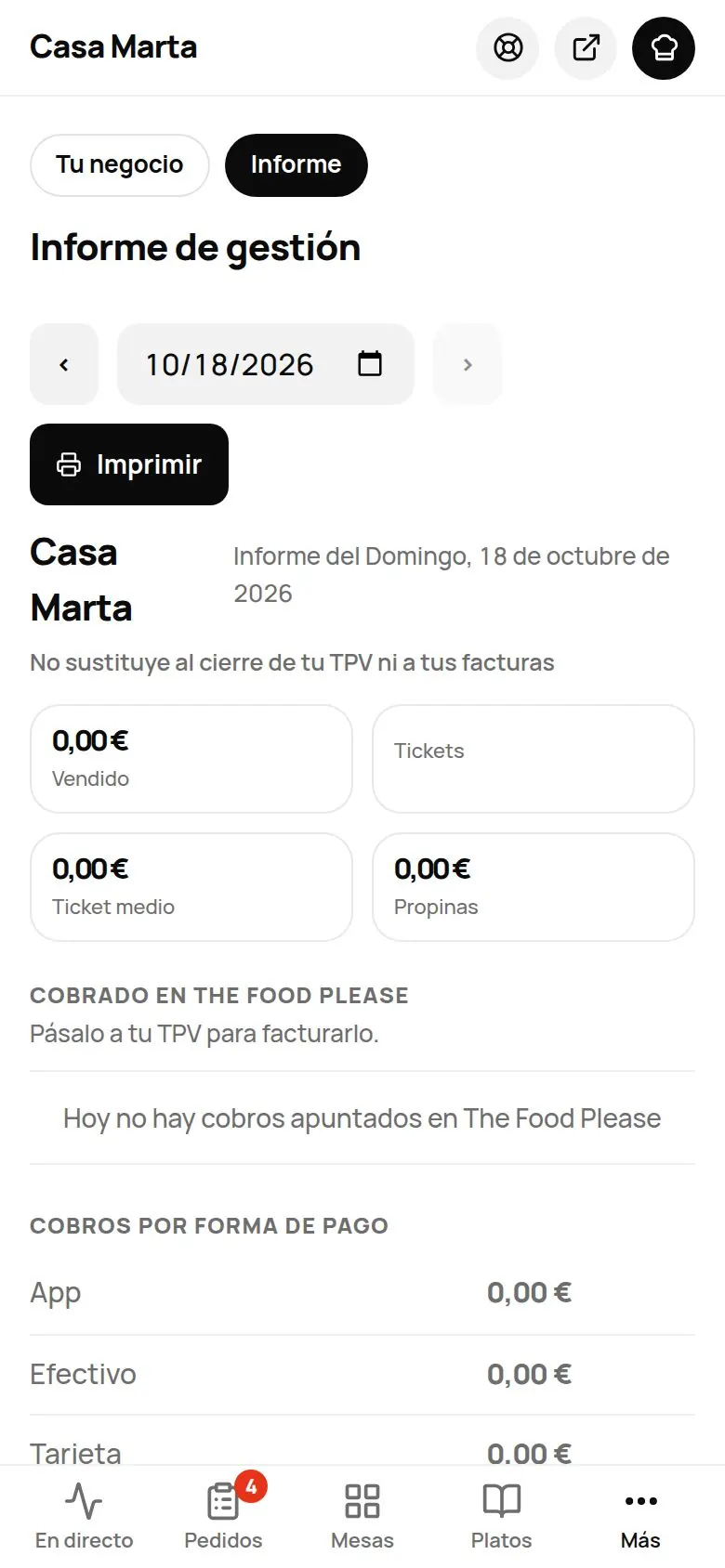
- Go to Business › Report. Move between days with the ‹ › arrows or pick the date.
- At the top: Sales, Checks, Avg ticket and Tips. If there are bills still unpaid, it tells you.
- Review payments by method, and sales by hour, category, dish and option.
- If you have a team with PINs, Sales by server (with an «In the app (no server)» row).
- In Unpaid and voided: open checks, voided, rejected, pickup orders nobody collected and online payments not completed.
«Collected in The Food Please»
The list of what was paid to you through the app that day (time, table or pickup order, method, amount and tip), so you can enter it in your POS and invoice it. You have Copy, Download CSV and, if you have a cloud printer, Print.
End of day
At the bottom of the Report you choose the End-of-day time (04:00 by default) and whether unpaid tables close automatically at that time. We explain it in Till and POS.
The daily summary by email
Every morning you get an email with yesterday's activity, if there was any: orders and sales, best sellers, today's bookings and those waiting to be accepted, and the customers you've sent to Google and any private feedback to read. Each line only appears if you have that module. It includes the Open the dashboard button.
It goes to your Alert email (Menu › Dishes › Venue settings › More options). If that's empty, it goes to the email you signed up with. If nothing happened yesterday, it isn't sent.
Tips
- Look at «Your business» once a week, calmly, and pick just one thing to improve.
- If a dish is «looked at a lot, ordered little», change its photo, price or description.
- Add staff on the floor and in the kitchen at your peak hour; try a set menu in your dead hour.
Common problems
| You see | What's happening | What to do |
|---|---|---|
| «Your numbers couldn't be loaded.» | Connection error. | Tap Try again. |
| «Not enough data for ideas yet…» | You've only been selling through the menu for a few days. | Come back in a few days. |
| «No data from the previous period to compare.» | There were no sales in the previous period. | That's normal when you're starting out. |
| The Report's sales don't match your POS | The report only counts what goes through The Food Please. | Add your POS figures separately. |