
The bill in the chat
Your guest asks for «the bill» and the waiter shows them their table's ticket, with everything they need to pay without waiting.
Updated 26 October 2026
On this page
What it's for
When a guest types «the bill», «can I pay?», «the receipt», «I'd like an invoice» or «how much are we at?» in the chat (in any of the 8 menu languages), the waiter shows them their table's bill summary and the buttons to settle it: pay from their phone, split the bill, add a tip, ask for an invoice with their tax ID or get it by email. No waiting for someone to come to the table.
It needs ordering to be on (it's part of your plan). It doesn't use answers or credits: it's answered from the table's data, without AI.
What your guest sees
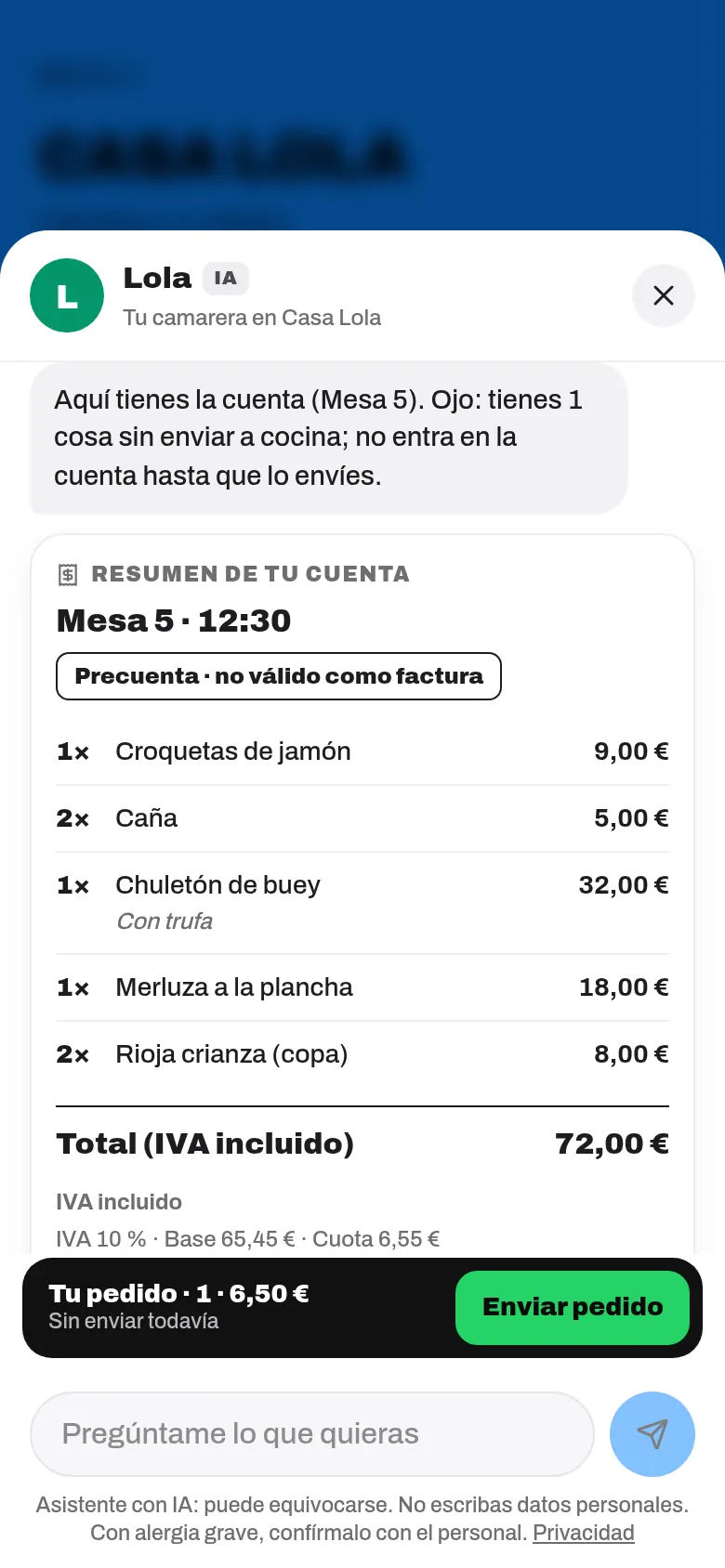
A «Your bill summary» card with:
- The table and the time, and the «Pre-bill · not valid as an invoice» label.
- What the table has ordered (including what other phones at that table or your team ordered): quantity, dish in the guest's language, options and price.
- Total (VAT included), what's already been paid and what's left to pay. If you have the Invoices module, also the VAT breakdown (indicative: «the official one is on the invoice»).
- Not sent to the kitchen: what the guest has in their order but hasn't sent yet («It isn't on the bill until you send it.»).
- The legal text: with Invoices, «The simplified invoice, with its QR code, is issued when you pay»; without it, «[your venue] gives you the simplified invoice when you pay».
Before the bill is settled, the waiter may suggest one single thing, if it fits the time of day and what the table has ordered: dessert after a main, or coffee after dessert («Before you settle up, fancy…?»). Once per visit, and never if the guest has an allergy or diet it doesn't suit, nor against your alcohol policy.
The buttons
Only the ones your venue can offer appear:
| Button | What it does | When it appears |
|---|---|---|
| Send what's pending | Opens the usual «Your order», to send what's missing. | If there's something not yet sent. |
| Pay from my phone | Opens the bill payment screen. | With Table payments on and Stripe ready. |
| Split the bill | Opens the payment screen on «Split». | Same as paying. |
| Add a tip | Opens the payment screen at the tip step. | Same as paying. |
| Ask the waiter for the bill | Sends «Ask for the bill» to the staff, like the button on the menu. | With table calls turned on and from a table. |
| Invoice with my tax ID | With self-invoicing and table payments, it explains that guests request it themselves on their receipt; otherwise, it lets the staff know they want an invoice with their tax ID («Table 7 asks for an invoice with tax ID · 38.50 €»). | Always. |
| Get it by email | Emails the summary to the guest. «Only used to send it to you: we don't keep your email.» | Always. |
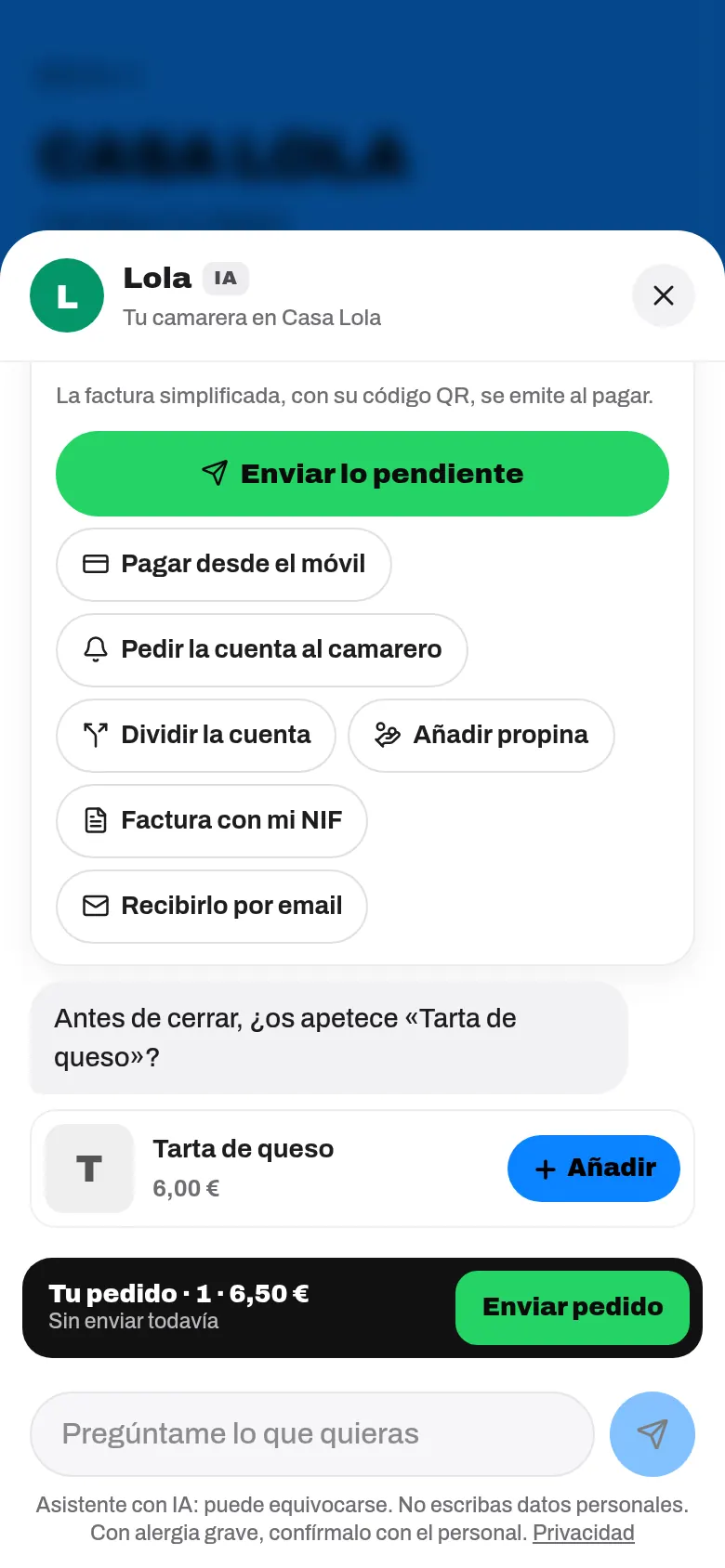
No button charges or sends anything by itself: they all open the menu's usual screens, with their confirmation step.
After paying: the receipt in the chat
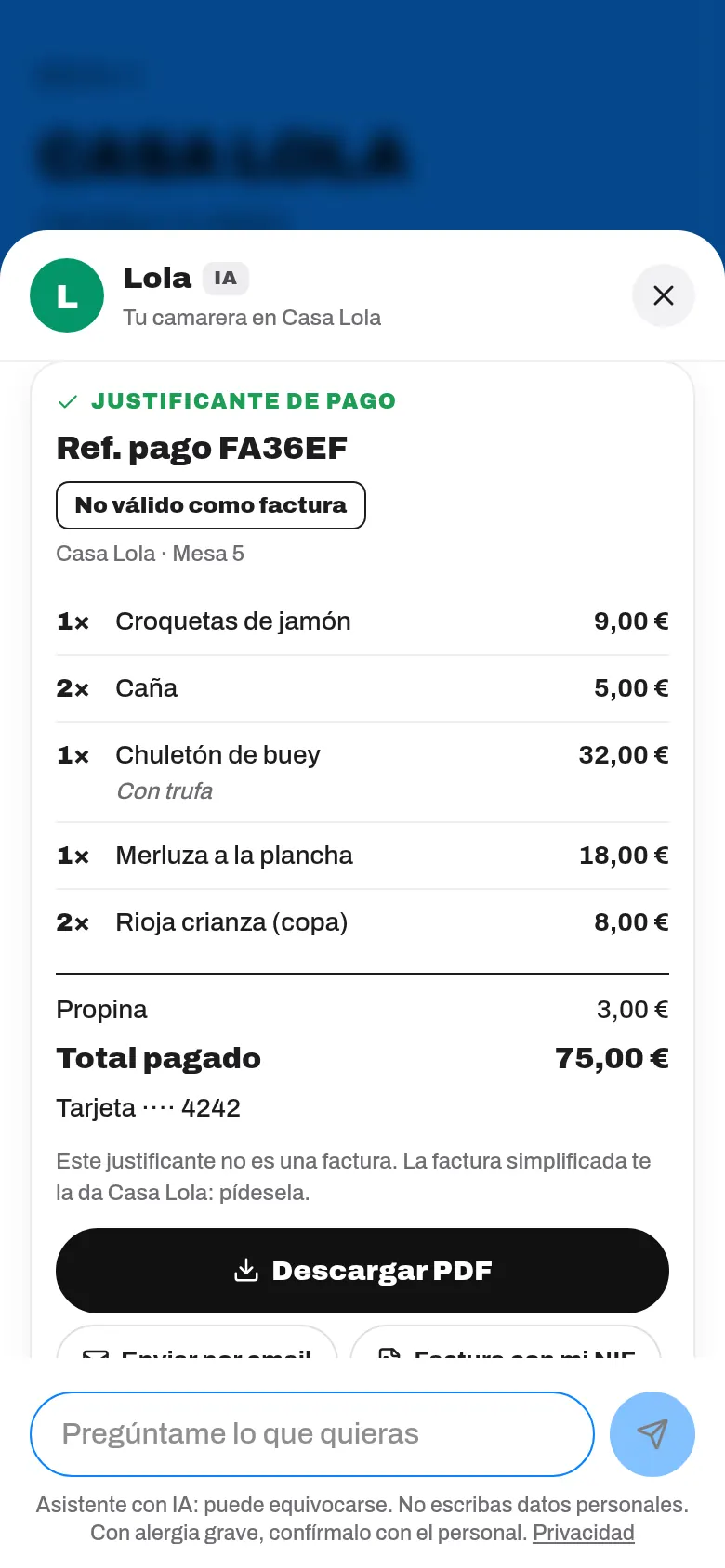
If the guest pays from the chat, when they close «Bill paid!» the chat opens with their receipt:
- With the Invoices module: «Paid! Here's your simplified invoice:», with its number and QR code.
- Without it: «Paid! Here's your payment receipt:», with «Not valid as an invoice» and the payment reference.
- Buttons: Download PDF, Send by email, Invoice with my tax ID and, if you have Google Reviews, Leave us a review.
Bill security
- The guest only sees their table's open bill. The conversation stays tied to the first table they ask for the bill from: if they then ask about another one, it asks them to scan that table's QR code.
- Without a table (for example, with the general QR code), they only see what they ordered from their own phone in the last 3 hours.
- No names or phone numbers appear on the ticket. The email used to send it isn't kept.
- If you've turned on Require new QR codes (see QR codes), the table's QR code is needed to see the bill.
Try it in your dashboard
At the test table, type «the bill»: you'll see the same summary with a yellow border and «Test table». There, the buttons don't charge or notify anyone («On your real menu, this would open «…».»), except Send what's pending, which sends the test table's order.
Common problems
| Your guest sees this | What's happening | What to do |
|---|---|---|
| «I can't tell your table from here: open the menu with your table's QR code…» | They came in without their table's QR code. | Ask them to scan their table's QR code, or ask the staff for the bill. |
| «This chat belongs to another table…» | They've already asked for another table's bill during this visit. | Ask them to scan the QR code of the table they're at. |
| «There's nothing on the bill yet…» | The table hasn't sent anything to the kitchen yet. | That's normal: the order has to be sent first. |
| «Pay from my phone» doesn't appear | You don't have Table payments, or Stripe isn't ready. | See Table and online payments. |