
What is the AI Waiter
A waiter powered by artificial intelligence inside your menu, with the name and personality you choose.
Updated 26 October 2026
On this page
What it's for
The AI Waiter is a virtual waiter that lives inside your menu. It runs on artificial intelligence (AI) and always says so. Your guests ask it questions from their phone, just as they would ask a waiter: «What do you recommend?», «Does this contain gluten?», «What should I drink with this?». It answers using your real menu, and anything it suggests goes into the order with one tap.
Every venue has its own waiter: you give it a name, a voice, a way of speaking, a look, a greeting and even a favourite dish (see Create your waiter). Venues that sign up from 18 October 2026 start with a name already set, different for each venue; older venues keep «Laura» until they change it. In this guide we say «your waiter» and use sample names in the examples.
What it does for your floor
- Answers in your guest's language about dishes, ingredients, prices, allergens and diets, in all 8 menu languages (see Languages).
- Serves like on the floor, with buttons: every answer is followed by buttons with the next step («Something to eat», «To drink», «Dessert», «A coffee», «Another round», «Send order»…), so the guest doesn't have to type.
- Suggests the whole meal: something to start, a main, a drink and a dessert or coffee. Your featured dishes (★) come first, and it takes the time of day into account (breakfast and coffee in the morning).
- Adds to the order with one tap: every dish it suggests has its own Add button. If the dish has options (size, how it's cooked…), they're chosen without leaving the chat.
- Suggests what's missing, without being pushy: after something is added it says «Noted!» and suggests the next thing the table is missing. It suggests each thing only once, and if the guest says «No, thanks», it doesn't insist.
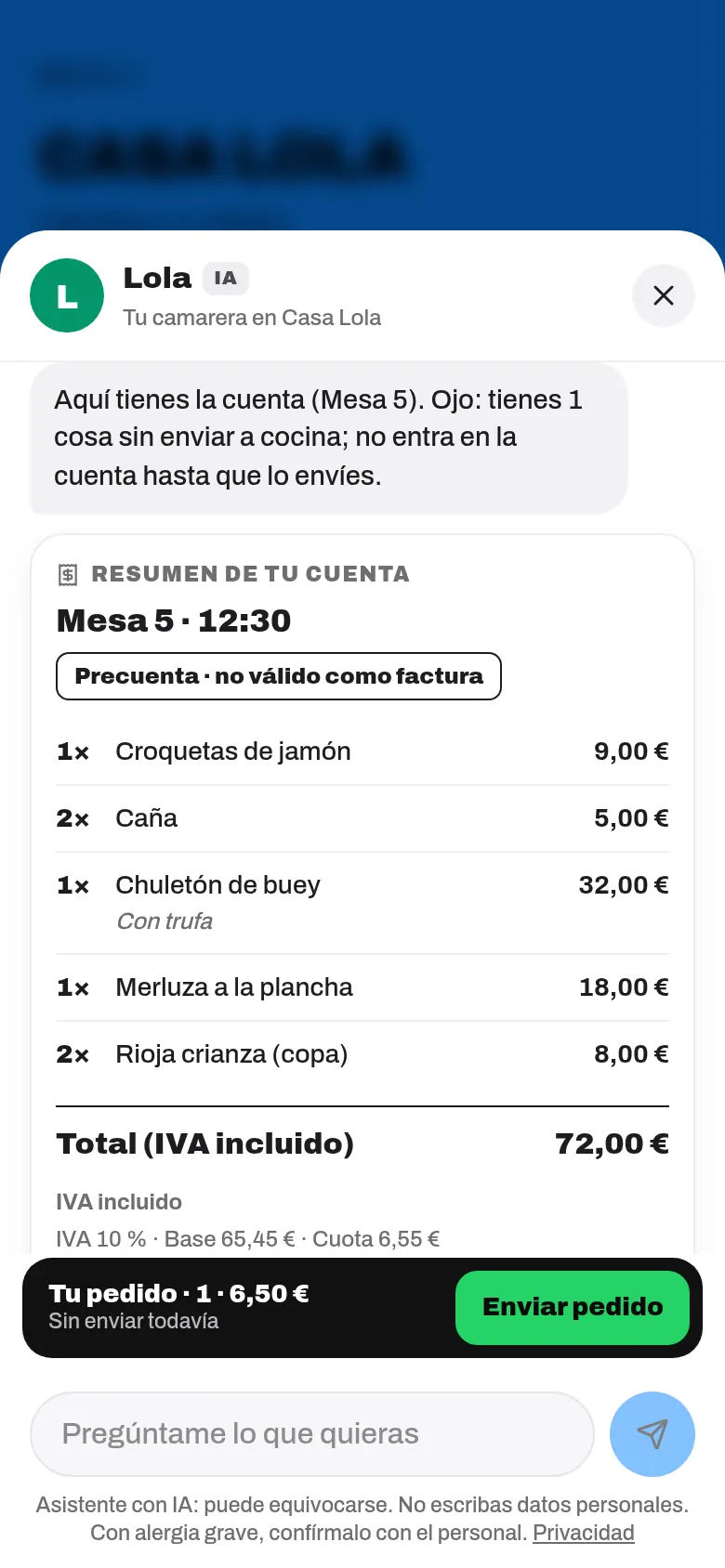
- Brings the bill: if the guest asks for «the bill», it shows the table's pre-bill and lets them pay, split it or ask for an invoice (see The bill in the chat).
- Celebrates the order: when the order has really gone to the kitchen, it says «Coming right up!» and, later on, offers dessert or coffee.
- From a table with a QR code it can call the waiter or ask for the bill, and if you have Bookings, it helps guests book a table.
Every month your dashboard shows the sales it has suggested and what your guests ask it (see Suggested sales and what guests ask).
What it never does
- It never makes up dishes, prices, offers or allergens. If a dish doesn't have its allergens marked, it says it doesn't have that information and to ask the staff.
- It never suggests anything that clashes with an allergy or diet the guest has mentioned, and it never offers alcohol to anyone who says they're underage, driving or pregnant.
- It never claims to be a person: it introduces itself as an AI virtual waiter.
- It never sends the order or takes payment on its own: the guest always goes through «Your order» or the usual payment screen, and confirms.
- It never suggests the dishes you tell it not to, nor alcoholic drinks outside the hours you choose (see What it suggests and its limits).
- It only talks about your menu and the order. If asked about anything else, it steers back to the menu.
How much it costs
| Item | Price |
|---|---|
| AI Waiter module | 29.90 €/month or 299 €/year + VAT. Included in the «Everything» plan. |
| Answers included | 300 AI answers a month. |
| From answer 301 | 1 credit per answer (see Credits). |
| Try it | 20 free tries in your dashboard, with your menu. |
The next-step buttons, order suggestions, «Noted!», «Coming right up!», the bill and anything answered from your menu data don't use answers or credits. And if you run out of answers and credits in a month, the waiter doesn't disappear: it keeps helping in basic mode (we explain it in Suggested sales and what guests ask).
Who manages it
Only the owner sees AI › AI waiter in the menu, turns it on, creates it and changes its settings. The manager and the owner can mark featured dishes (★) on the menu.