
Plans, modules and prices
What each plan includes and what you can add.
Updated 26 October 2026
The three plans
All prices exclude VAT. Paying yearly gives you 2 months free (you pay for 10 and get 12). No lock-in.
| Everything | Guests come back | Menu & floor | |
|---|---|---|---|
| Monthly | 99.99 € | 59.80 € | 29.90 € |
| Yearly | 999.90 € | 598 € | 299 € |
| Founder price (monthly) | 89.99 € | 49.80 € | 19.90 € |
| To start | Paid from day one · 30-day guarantee | Paid from day one · 30-day guarantee | 14 days free, no card |
| Includes | Everything in Guests come back · Table and online payments (2 % per payment) · Stock and recipe costing · Veri*factu-ready invoices · AI Waiter (300 answers a month) · Self-order kiosk · Several venues · and the extras below | Everything in Menu & floor · Bookings with deposit · Stamps (loyalty) · Google reviews · Menu in up to 8 languages | QR menu with table ordering and kitchen · POS with till, floor plan, customer display and cash drawer · Customer club and automatic English |
Also, only in Everything:
- No The Food Please branding on your menu: we remove the «The Food Please» footer (your legal links stay).
- Priority WhatsApp support: «Your WhatsApp jumps the queue».
- We set up your menu and improve your dish photos: send us your menu and photos and we get it ready (lighting, background and framing, without changing the dish).
All plans include, at no extra cost, table ordering and kitchen, the POS, the customer club, the team with PINs and the order printers.
The founder price
The first 30 venues to activate a paid plan get the base plan 10 € cheaper, for life: 19.90 €/month (or 199 €/year) instead of 29.90 €. They count in order of payment, not sign-up. You keep it as long as you don't cancel. The AI Waiter and single modules have no founder price. If there are still places left, you'll see it in Settings › Billing.
The 30-day guarantee
If no order has reached you through the QR code in the first 30 days after your first charge, we refund that first month. The conditions are in Your subscription and payments.
Single modules
Only need one thing? Add it to your plan from 9.90 € a month. No free trial and no lock-in.
| Module | Monthly | Yearly | Needs | More info |
|---|---|---|---|---|
| AI Waiter | 29.90 € | 299 € | — | AI Waiter |
| Stock and recipe costing | 19.90 € | 199 € | — | Stock |
| Online payments | 14.90 € + 2 % per payment | 149 € | Orders (included) | Payments |
| Bookings | 14.90 € | 149 € | — | Bookings |
| Invoices | 14.90 € | 149 € | POS (included) | Invoices |
| Self-order kiosk | 14.90 € | 149 € | Orders (included) | Kiosk |
| Several venues | 14.90 € per additional venue | 149 € | — | Several venues |
| Loyalty (stamps) | 9.90 € | 99 € | Club (included) | Stamps |
| Google reviews | 9.90 € | 99 € | — | Reviews |
| Multilingual menu | 9.90 € | 99 € | — | Languages |
| Staff time clock | 9.90 € | 99 € | Team with PINs (included) | Time clock |
The plans work out cheaper than their single modules: «Bundles cost a third less than their single modules; Everything, over 40 % less.» The AI Waiter and the Self-order kiosk are included in Everything; with the other two plans they're added separately (29.90 € and 14.90 € a month).
Credits (for AI photos and the AI Waiter's extra answers) aren't a module: you buy them in one-off packs. See Credits.
Under Coming soon you'll see what we're working on (for example, the NFC card for the bar), with a Notify me button.
The Modules tab
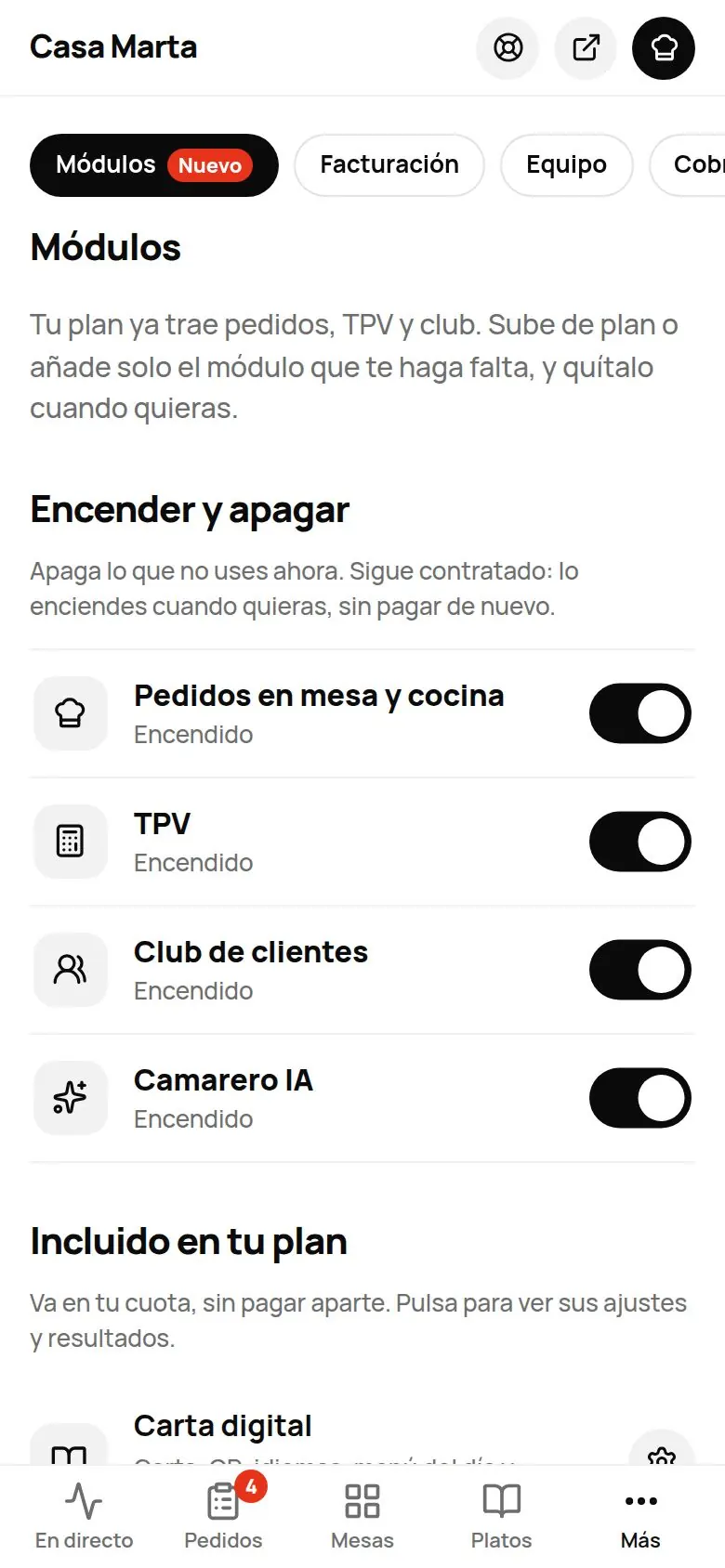
In Settings › Modules (owner only) you have, in this order:
- Turn on and off: «Turn off what you don't use now. It stays in your plan: turn it back on any time, no extra charge.» When you turn a module off, its tab disappears from the menu.
- Included in your plan: digital menu, orders, POS and club.
- Your fee: what you pay, added up.
- Your plan: to upgrade or downgrade (see below).
- Single modules, Several venues and Coming soon.
Each module shows its status: «Included in your plan», «Active», «Ends [date]», «Needs X»…
Turning on a single module
- In Settings › Modules, open the module (See how it works).
- Tap Turn on for 14.90 €/mo + VAT (with its price).
- Confirm: «Turn on [module] for [price]/mo + VAT? Renews automatically every month until you cancel…». If you already have a saved card, it's used; if not, Stripe's payment page opens.
If it needs another module first, you'll see «First activate…». When you tap something in the dashboard that you don't have yet, a sheet also appears with two options: upgrade to the plan that includes it or add just that module.
Cancelling a module
On its page, Cancel module: «Cancel [module]? It stays on until the end of the paid period.». If other modules depend on it, they're cancelled too (it tells you). Until that date you can undo it with Don't cancel. Anything included in your plan can't be cancelled on its own.
Changing plan
In Settings › Billing or in Settings › Modules, Your plan block:
- Upgrade: you'll see the most complete plan first; from Menu & floor, for example, «Upgrade to Everything for +70.09 €/mo» with Upgrade now and, below it, «Or just Guests come back · +29.90 €/mo». Today you only pay the prorated amount until your next charge and, from then on, the new fee. If you were already paying for a module included in the new plan, we credit what was left.
- Downgrade: Downgrade to …. You keep everything until the end of the paid period and then switch. There are no refunds. Until that day you can tap Undo.
- Add just one module: if you only need one thing.
| From | To | Extra per month |
|---|---|---|
| Menu & floor | Guests come back | +29.90 € |
| Menu & floor | Everything | +70.09 € |
| Guests come back | Everything | +40.19 € |
Common problems
| You see | What's happening | What to do |
|---|---|---|
| «It's already included in your plan.» | Your plan already has it. | Find it under «Turn on and off». |
| «You need X first.» | That module depends on another one. | Turn on the one it asks for first. |
| «The bank declined the charge. Check your card in Billing.» | Your card has declined the payment. | Change it in Manage payment and invoices. |
| «You already have a downgrade scheduled: undo it first.» | You've already asked to downgrade. | Tap Undo and choose again. |
| «Reactivate your plan in Billing first.» | Your plan is paused. | Reactivate it (see Your subscription). |