
What credits are and what they're for
A single balance for everything the AI does for you.
Updated 26 October 2026
On this page
What they're for
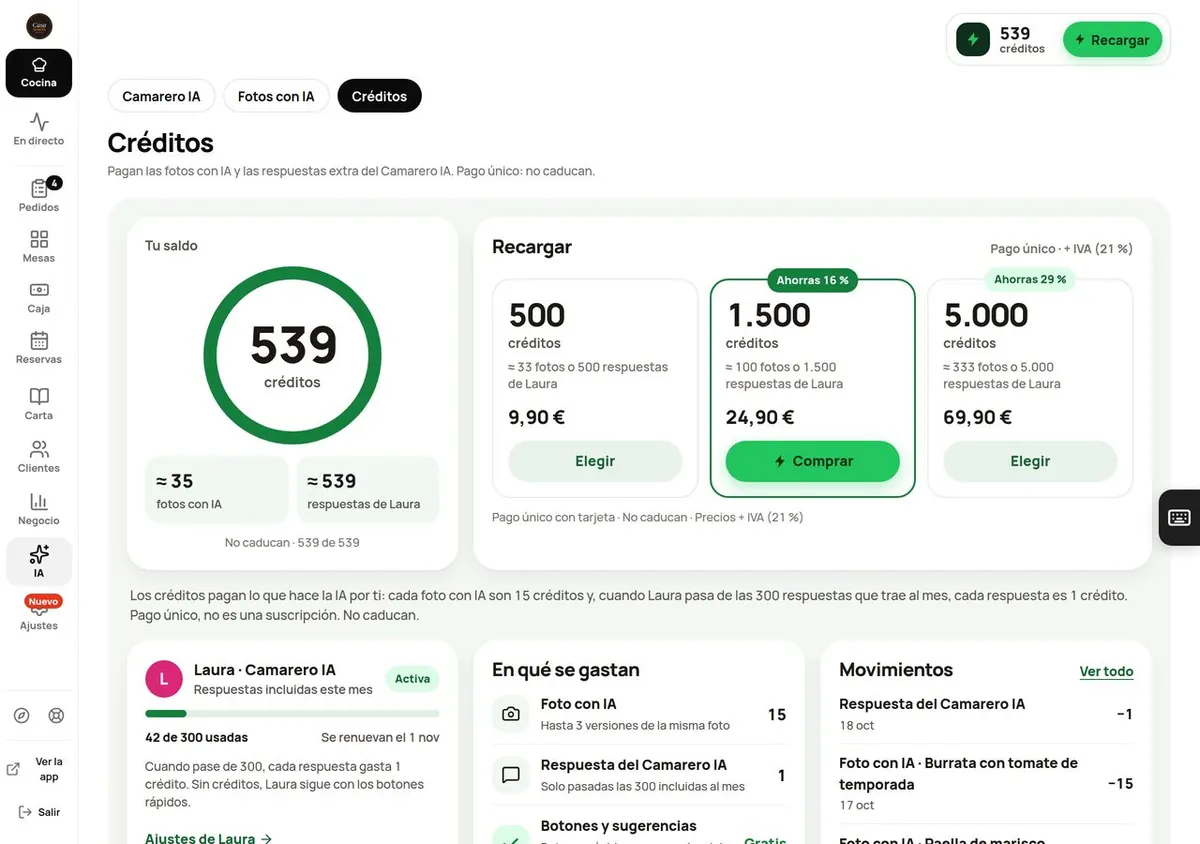
Credits are a single balance that pays for what the AI does for you. You buy them once, with no subscription, and they never expire. Right now they pay for two things:
| What | How many credits |
|---|---|
| AI photo (up to 3 versions of the same photo) | 15 |
| AI Waiter answer, only once it has used the 300 included for the month | 1 |
| Chat buttons, order suggestions, the bill in the chat, «Noted!» and «Coming right up!» | Free |
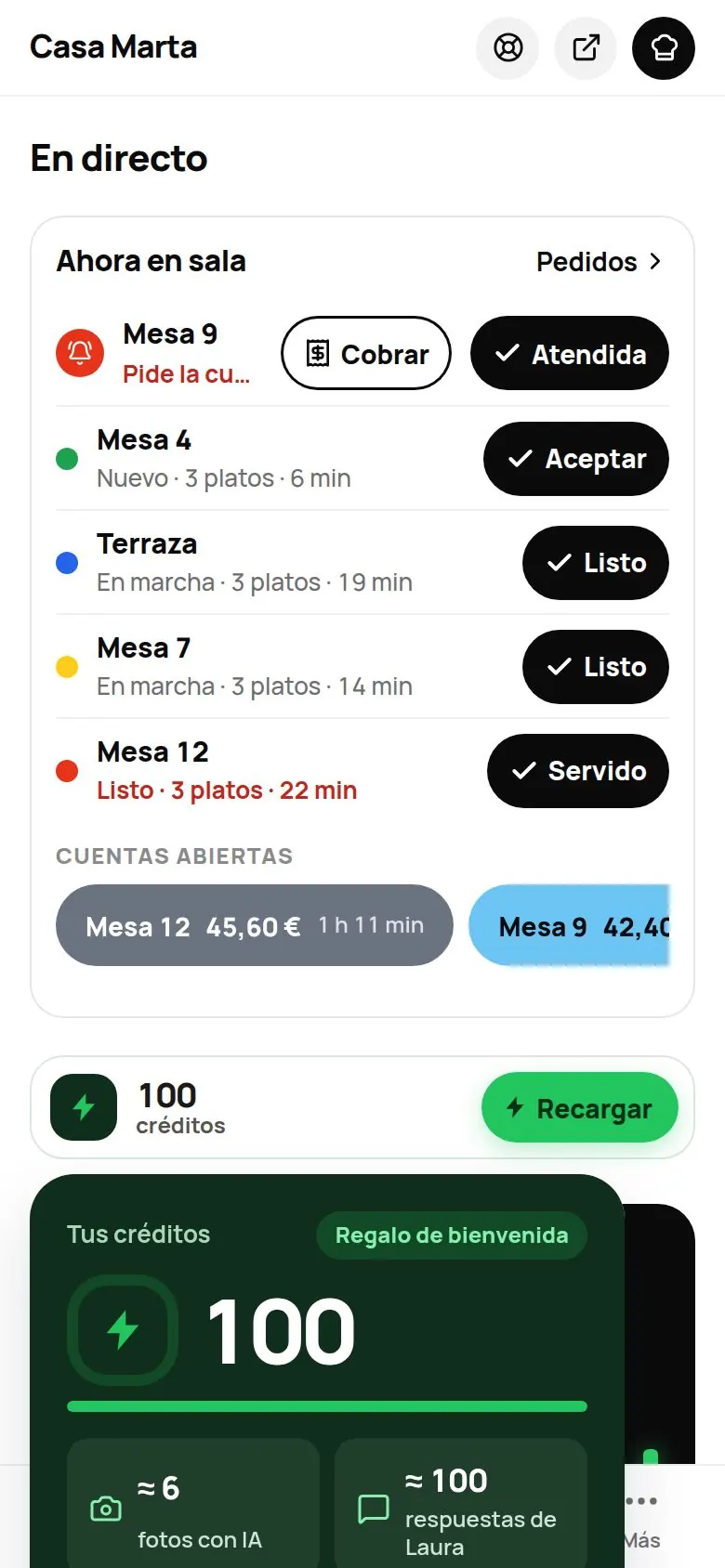
When you start, we give you 100 welcome credits, once per venue. You get them the first time you open AI › Credits or when you create your first AI photo. That's enough for about 6 AI photos.
Where to see your balance
- In the AI › Credits tab: «Your balance», what it covers («≈ N AI photos» and «≈ N AI waiter answers»), the packs, what they're spent on and your history.
- In the sidebar (computer): at the very bottom, above your name, the credits card: the lightning bolt, your balance, the «AI waiter this month 12/300» bar (if you have it; if not, «≈ 6 photos or 100 AI waiter answers») and ⚡ Top up, which takes you straight to the packs. When credits are low it turns amber («Running low»); at 0, red. On a laptop, with the narrow sidebar, only the bolt and the number show. Tapping it opens the same drop-down as the chip.
- On your phone: the chip, at the top of Live: a green square with a lightning bolt, your number of credits and ⚡ Top up. Tapping it shows what your credits cover and the «What they're spent on» and «History» links.
How long they last
It depends on what you use. Some reference figures:
| Credits | Enough for |
|---|---|
| 100 (welcome) | about 6 AI photos, or 100 AI Waiter answers beyond the month's 300 |
| 500 | about 33 photos, or 500 answers |
| 1,500 | about 100 photos, or 1,500 answers |
| 5,000 | about 333 photos, or 5,000 answers |
If you only use the AI Waiter and it stays within 300 answers a month, you don't spend a single credit.
The packs
| Pack | Price | With VAT (21%) | Saving |
|---|---|---|---|
| 5,000 credits | 69.90 € | 84.58 € | Save 29% |
| 1,500 credits | 24.90 € | 30.13 € | Save 16% |
| 500 credits | 9.90 € | 11.98 € | — |
Prices in the dashboard are shown without VAT, with the note «Prices + VAT (21%)». You'll see the total with VAT on the payment page before you pay; for example: «One-off payment of 9.90 € + VAT (21%) = 11.98 €». It's a one-off payment, not a subscription. How to buy: see Top up and see your history.
If your balance runs out
Nothing breaks:
- With fewer than 50 credits, the chip turns amber and in AI › Credits you'll see «You have N credits left».
- With fewer than 15, there aren't enough for an AI photo: the dish page tells you and offers to top up.
- At 0, the chip turns red («No credits») and you'll see: «You're out of credits. Nothing breaks: the AI waiter stays in basic mode. Top up to get the AI back.»
- The AI Waiter stays on the menu with its buttons and suggestions. It only stops writing AI answers until you top up or the next month starts (and its 300 answers come back).
Quick questions
Do they expire?
No. Neither the ones you buy nor the welcome ones.
Do they renew every month?
No: credits are a balance that gets used up. What renews every month is the AI Waiter's 300 included answers.
Do I need the AI Waiter to use credits?
No. You can use them just for AI photos.