
Allergens and diets
The 14 allergens and how your guests see them.
Updated 26 October 2026
On this page
What it's for
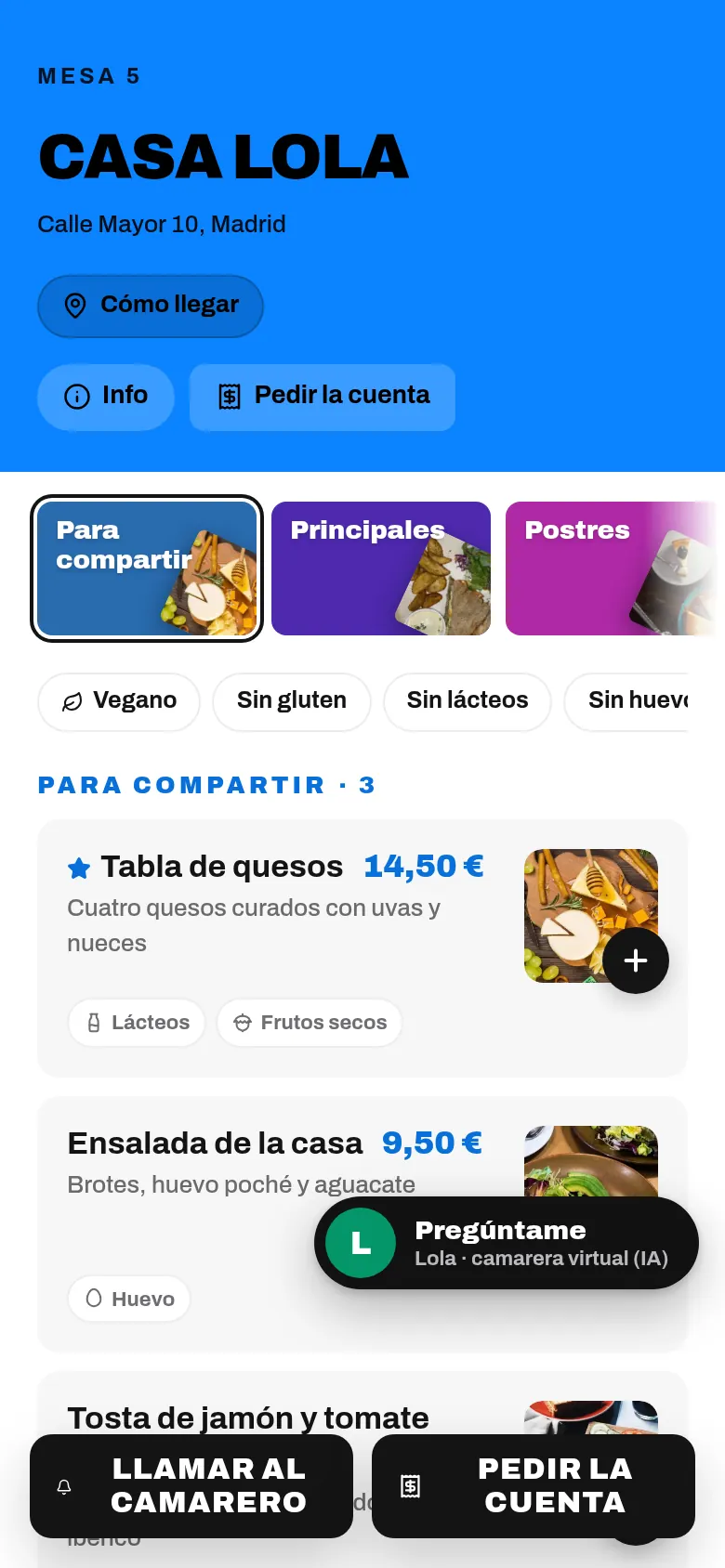
Providing allergen information for every dish is a legal requirement for your venue (EU Regulation 1169/2011). In The Food Please you mark them once on each dish and your guests see them on the menu, with an icon, and can filter the menu to see only what they can eat.
Marking a dish's allergens
- Open the dish in Menu › Dishes (tap it, or ··· › Edit).
- In Allergens, tap the ones it contains. They turn black.
- If it has none, tap ✓ No allergens.
- Press Save.
The 14 allergens, in the official order in which they appear on the form:
| 1–5 | 6–10 | 11–14 |
|---|---|---|
| Gluten | Soy | Sesame |
| Crustaceans | Dairy | Sulphites |
| Egg | Nuts | Lupin |
| Fish | Celery | Molluscs |
| Peanuts | Mustard |
There's also Vegan 🌱 for dishes with nothing of animal origin.
If a dish has options (types of milk, for example), each option has its own allergens in Menu › Dishes › Options.
Dishes with no allergen information
A dish has its allergens stated when you've marked at least one of the 14, or «No allergens». If not, the panel warns you:
- At the top of the Menu: «N dishes without allergens set» and «On your menu they don't show as suitable in the “No gluten”, “No lactose”… filters. Mark their allergens or “No allergens”.», with Complete, which opens the first one.
- Each one carries the label «No allergens set» in the list (imported ones say «Allergens not reviewed»).
- In Venue settings, the «Allergens» row tells you how many are left, or «All dishes reviewed».
When you import your menu, every dish arrives with its allergens pending and, on your menu, says «Allergens: ask the staff» until you review them. Open them one by one and mark their allergens. If you've already reviewed them all with your kitchen, you can press I’ve reviewed the allergens of all dishes. It asks you to confirm and removes the pending label; it doesn't set «No allergens» on any of them, so any that still have nothing marked won't show as suitable in the filters.
What your guests see
- Each dish shows its allergens with an icon and name, in the list and when the dish is opened. In the «Instagram grid» design, when the dish is opened.
- At the top of the menu they have a filter with buttons: Vegan, No gluten, No dairy, No egg, No nuts, No fish, No shellfish and No soy (plus others, such as «No sesame», if any dish contains them). «No shellfish» also removes crustaceans and molluscs.
- With a filter on, dishes with no allergen information never show as suitable: they go to the end of their category, after the notice «Allergens not stated · ask the staff».
- If no dish matches the filter, they see «No dish matches the filter. Remove one.» If only dishes without allergen information are left: «No dish is confirmed for this filter. The ones below have no allergen information: ask the staff.»
Tips
- Do the review with your chef present, with the recipes and your suppliers' product sheets.
- Every time you change a recipe or a supplier, review that dish's allergens.
- Even though the menu shows them, your team must be able to answer if a guest asks.
Common problems
| You see this | What's happening | What to do |
|---|---|---|
| «Allergens: ask the staff» on your menu | That dish's allergens haven't been reviewed. | Open it, mark its allergens or «No allergens» and save. |
| Your guests don't see the filter | No dish has allergens marked, or you're using «Instagram grid». | Mark the allergens; if you want the filter, choose another design. |
| A gluten-free dish appears at the end with «Allergens not stated» | It has neither «No allergens» nor any allergen marked. | Open it, mark what it contains (or «No allergens») and save. |
| You can't find «Vegetarian» | Only «Vegan» exists. | Mention it in the dish description. |